For the first sixteen seconds, the ad is only about Leo’s problem. Fitbod doesn’t appear until Marcus pulls out his phone.
Write every line in the characters’ own words. Keep the whole script to about sixty words, so the characters have time to react between lines. The Fitbod script is sixty-two words across eight shots.
Step 3: the animation
Two things make the ad look like Pixar: the characters look the same in every shot, and the render looks like a frame from an animated film. Character sheets handle the characters, and the style blocks in the two prompts below handle the render.
Make a character sheet for every character
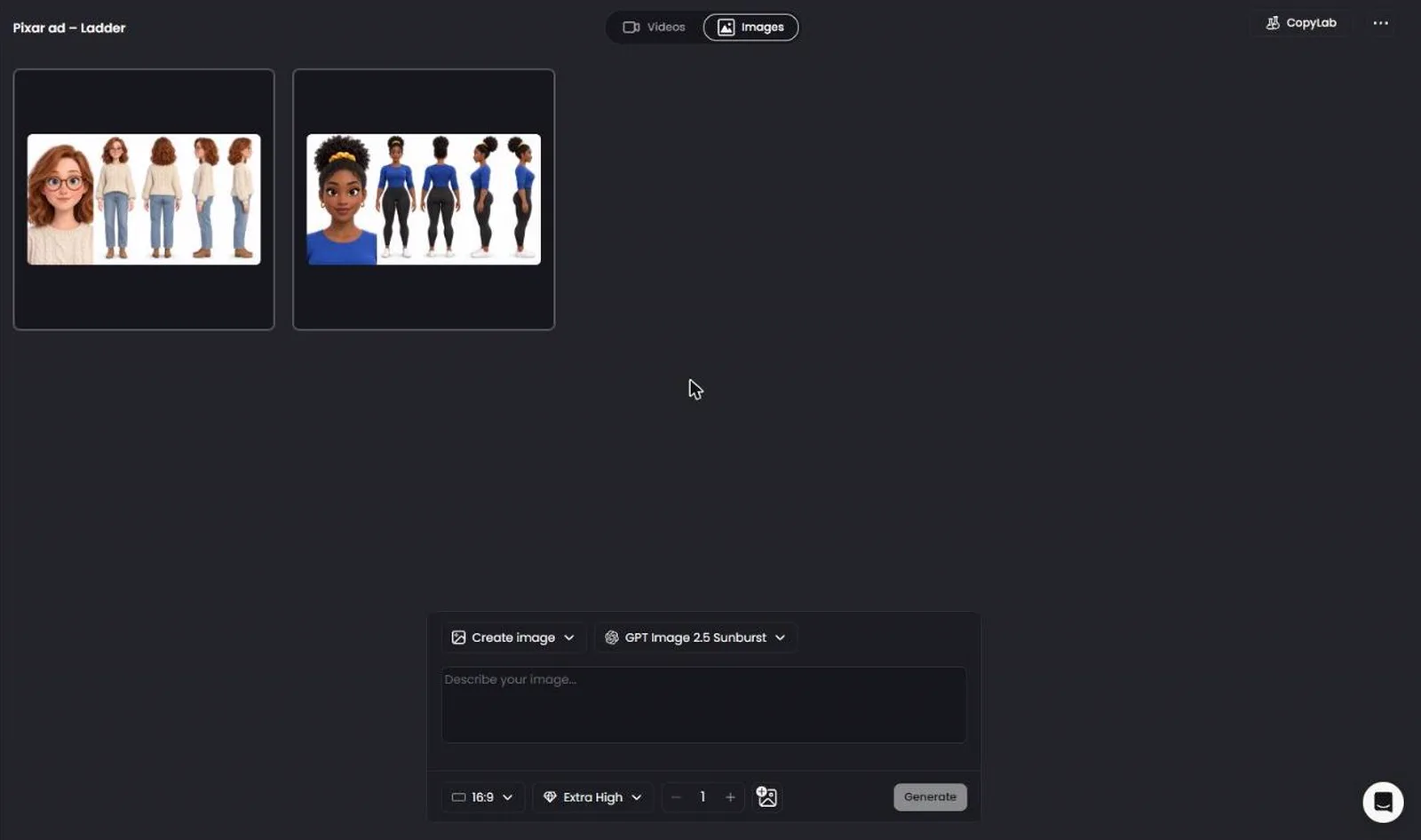
A character sheet shows one character five times on pure white: a close-up of the face, then the full body from the front, the back, the left and the right.
With only one image, the video model has to guess what the character looks like from the side and from behind, and it guesses differently in every shot. The sheet shows it every side, so Marcus looks like Marcus in the last shot too. I explain the method in more detail in the guide to keeping one consistent character across all your AI clips.

1. Go to Projects, click New project and open the Images tab.
2. Pick GPT Image 2.5 Sunburst, 16:9 and Extra High. The five panels need the width of 16:9.

3. Paste the prompt below, fill in the CHARACTER part and click Generate.
The STYLE line gives the character the Pixar look, and the NOT line keeps out photorealism, anime and 2D.
In the CHARACTER part, describe what makes the character easy to recognize. For Marcus, the big lifter in the Fitbod ad, I wrote down his bald head, short goatee, oversized arms and bright red sneakers.
Generate one sheet first and check that the face matches in all five panels before you make the next one. The finished sheets are saved in the project’s Images tab.
Use the real product
Never let an AI model redraw your product, because the text on the label turns into gibberish. Use the product photo from the brand’s website, or for an app, its screens from the App Store. For Fitbod, I used two screens from its App Store page: the workout plan and the set tracking.
Make the video on Seedance 2.5
Seedance 2.5 makes all thirty seconds in one generation, with the dialogue, lip sync, music and sound effects in the same clip, so there’s nothing to stitch afterward. For Pixar-style ads, it gave me the most coherent results of any video model and followed the prompt the closest. If you want cheaper options for this format, they’re in the guide to which AI video model to use for every type of ad.
1. In the same project, open the Videos tab.
2. Pick Seedance 2.5 and References, then set 9:16, 30s and 1080p.
3. Click the image button. Add the character sheets first with Select image, then the product images with Upload image. Seedance numbers them in the order you add them: the first is @Image1, the second is @Image2, and so on.

4. Paste the prompt below, fill in the brackets and click Generate.
The reference images are character sheets and a product photo to
follow. They never appear in the video.

[Generation Goal]
Generate a 30-second 3D animated comedy ad set in [place]. The
central subjects are [Name 1], [who they are], and [Name 2],
[who they are]. The primary event: [what happens].

[Reference Roles]
@Image1 defines [Name 1]'s face, body, hair, clothing and
colors. Do not use the white background or the panel layout.
@Image2 defines [Name 2]'s face, body, hair, clothing and
colors. Do not use the white background or the panel layout.
@Image3 defines the [product].

[Characters]
CHARACTER: [Name 1] looks exactly like the character sheet
@Image1 in every shot: same face, hair, outfit, colors and
proportions.
CHARACTER: [Name 2] looks exactly like the character sheet
@Image2 in every shot: same face, hair, outfit, colors and
proportions.

PRODUCT: The [product] is the exact product in @Image3: same
shape, proportions, colors, logo, label and details. It is
placed in the animated world and lit by the scene's light,
matching the look of everything around it.

LOOK: A modern 3D animated feature film. Every character, place
and object is rendered in the same stylized CG world: appealing
character designs with large expressive eyes, soft
subsurface-scattered skin, sculpted hair with a gentle sheen,
and real fabric with visible weave. Sets are richly detailed and
slightly idealized, with believable materials, rounded shapes
and a lived-in feel. Light is cinematic and physically based: a
clear key light, warm bounced fill, rim light separating
characters from the background, soft global illumination and
gentle atmosphere such as dust motes or light haze where it
suits the scene. Colors are rich, saturated and harmonious, with
a distinct color mood for each scene. Shallow depth of field and
filmic tone mapping. The finish is clean, sharp and noise-free,
like a frame from a theatrical animated film.

MOTION: Feature-animation acting and movement. Every action has
weight and follows the principles of animation: anticipation
before big moves, follow-through and overlapping action on hair,
clothing and loose parts, subtle squash and stretch, movement
along curved arcs, and easing in and out of poses. Timing is
snappy and clear: characters move into strong, readable poses
and keep moving slightly in place, never frozen. Faces lead the
acting: eyes and brows change first, with natural blinks, eye
darts and micro-expressions, and every emotion reads from across
the room. When a character speaks, the mouth forms clear shapes
in sync with each word, and the head, hands and body move with
the line. Characters touch objects with real contact and weight.
Comic moments use clear reactions: a pause, a double take, a
widening of the eyes.
CAMERA: Cinematic and deliberate. Composed shots with a clear
subject, using smooth dollies, slow push-ins, gentle cranes,
soft rack focus and motivated cuts between shots. No handheld
shake.

[Setting]
[The place, described in detail.]

[Stage 1] 0-3 seconds
[What happens.] [Name] says: {[hook line]}
<[sound effect]>

[Stage 2] 3-9 seconds
[What happens.] [Name] says: {[problem line]}
<[sound effect]>

[Stage 3] 9-16 seconds
[What happens.] [Name] says: {[agitation line]}
<[sound effect]>

[Stage 4] 16-25 seconds
[The product comes in and works.] [Name] says: {[solution line]}
<[sound effect]>

[Stage 5] 25-30 seconds
[Life after the product, with the product clearly in shot.]
[Name] says: {[last line, naming the product]}
<[sound effect]>

[Audio]
([The music: genre and instruments, low under the dialogue,
lifting when the product comes in.])

[Maintain Consistency]
Exactly two main characters, [Name 1] and [Name 2]
The reference images are character sheets and a product photo to
follow. They never appear in the video.

[Generation Goal]
Generate a 30-second 3D animated comedy ad set in [place]. The
central subjects are [Name 1], [who they are], and [Name 2],
[who they are]. The primary event: [what happens].

[Reference Roles]
@Image1 defines [Name 1]'s face, body, hair, clothing and
colors. Do not use the white background or the panel layout.
@Image2 defines [Name 2]'s face, body, hair, clothing and
colors. Do not use the white background or the panel layout.
@Image3 defines the [product].

[Characters]
CHARACTER: [Name 1] looks exactly like the character sheet
@Image1 in every shot: same face, hair, outfit, colors and
proportions.
CHARACTER: [Name 2] looks exactly like the character sheet
@Image2 in every shot: same face, hair, outfit, colors and
proportions.

PRODUCT: The [product] is the exact product in @Image3: same
shape, proportions, colors, logo, label and details. It is
placed in the animated world and lit by the scene's light,
matching the look of everything around it.

LOOK: A modern 3D animated feature film. Every character, place
and object is rendered in the same stylized CG world: appealing
character designs with large expressive eyes, soft
subsurface-scattered skin, sculpted hair with a gentle sheen,
and real fabric with visible weave. Sets are richly detailed and
slightly idealized, with believable materials, rounded shapes
and a lived-in feel. Light is cinematic and physically based: a
clear key light, warm bounced fill, rim light separating
characters from the background, soft global illumination and
gentle atmosphere such as dust motes or light haze where it
suits the scene. Colors are rich, saturated and harmonious, with
a distinct color mood for each scene. Shallow depth of field and
filmic tone mapping. The finish is clean, sharp and noise-free,
like a frame from a theatrical animated film.

MOTION: Feature-animation acting and movement. Every action has
weight and follows the principles of animation: anticipation
before big moves, follow-through and overlapping action on hair,
clothing and loose parts, subtle squash and stretch, movement
along curved arcs, and easing in and out of poses. Timing is
snappy and clear: characters move into strong, readable poses
and keep moving slightly in place, never frozen. Faces lead the
acting: eyes and brows change first, with natural blinks, eye
darts and micro-expressions, and every emotion reads from across
the room. When a character speaks, the mouth forms clear shapes
in sync with each word, and the head, hands and body move with
the line. Characters touch objects with real contact and weight.
Comic moments use clear reactions: a pause, a double take, a
widening of the eyes.
CAMERA: Cinematic and deliberate. Composed shots with a clear
subject, using smooth dollies, slow push-ins, gentle cranes,
soft rack focus and motivated cuts between shots. No handheld
shake.

[Setting]
[The place, described in detail.]

[Stage 1] 0-3 seconds
[What happens.] [Name] says: {[hook line]}
<[sound effect]>

[Stage 2] 3-9 seconds
[What happens.] [Name] says: {[problem line]}
<[sound effect]>

[Stage 3] 9-16 seconds
[What happens.] [Name] says: {[agitation line]}
<[sound effect]>

[Stage 4] 16-25 seconds
[The product comes in and works.] [Name] says: {[solution line]}
<[sound effect]>

[Stage 5] 25-30 seconds
[Life after the product, with the product clearly in shot.]
[Name] says: {[last line, naming the product]}
<[sound effect]>

[Audio]
([The music: genre and instruments, low under the dialogue,
lifting when the product comes in.])

[Maintain Consistency]
Exactly two main characters, [Name 1] and [Name 2]
The reference images are character sheets and a product photo to
follow. They never appear in the video.

[Generation Goal]
Generate a 30-second 3D animated comedy ad set in [place]. The
central subjects are [Name 1], [who they are], and [Name 2],
[who they are]. The primary event: [what happens].

[Reference Roles]
@Image1 defines [Name 1]'s face, body, hair, clothing and
colors. Do not use the white background or the panel layout.
@Image2 defines [Name 2]'s face, body, hair, clothing and
colors. Do not use the white background or the panel layout.
@Image3 defines the [product].

[Characters]
CHARACTER: [Name 1] looks exactly like the character sheet
@Image1 in every shot: same face, hair, outfit, colors and
proportions.
CHARACTER: [Name 2] looks exactly like the character sheet
@Image2 in every shot: same face, hair, outfit, colors and
proportions.

PRODUCT: The [product] is the exact product in @Image3: same
shape, proportions, colors, logo, label and details. It is
placed in the animated world and lit by the scene's light,
matching the look of everything around it.

LOOK: A modern 3D animated feature film. Every character, place
and object is rendered in the same stylized CG world: appealing
character designs with large expressive eyes, soft
subsurface-scattered skin, sculpted hair with a gentle sheen,
and real fabric with visible weave. Sets are richly detailed and
slightly idealized, with believable materials, rounded shapes
and a lived-in feel. Light is cinematic and physically based: a
clear key light, warm bounced fill, rim light separating
characters from the background, soft global illumination and
gentle atmosphere such as dust motes or light haze where it
suits the scene. Colors are rich, saturated and harmonious, with
a distinct color mood for each scene. Shallow depth of field and
filmic tone mapping. The finish is clean, sharp and noise-free,
like a frame from a theatrical animated film.

MOTION: Feature-animation acting and movement. Every action has
weight and follows the principles of animation: anticipation
before big moves, follow-through and overlapping action on hair,
clothing and loose parts, subtle squash and stretch, movement
along curved arcs, and easing in and out of poses. Timing is
snappy and clear: characters move into strong, readable poses
and keep moving slightly in place, never frozen. Faces lead the
acting: eyes and brows change first, with natural blinks, eye
darts and micro-expressions, and every emotion reads from across
the room. When a character speaks, the mouth forms clear shapes
in sync with each word, and the head, hands and body move with
the line. Characters touch objects with real contact and weight.
Comic moments use clear reactions: a pause, a double take, a
widening of the eyes.
CAMERA: Cinematic and deliberate. Composed shots with a clear
subject, using smooth dollies, slow push-ins, gentle cranes,
soft rack focus and motivated cuts between shots. No handheld
shake.

[Setting]
[The place, described in detail.]

[Stage 1] 0-3 seconds
[What happens.] [Name] says: {[hook line]}
<[sound effect]>

[Stage 2] 3-9 seconds
[What happens.] [Name] says: {[problem line]}
<[sound effect]>

[Stage 3] 9-16 seconds
[What happens.] [Name] says: {[agitation line]}
<[sound effect]>

[Stage 4] 16-25 seconds
[The product comes in and works.] [Name] says: {[solution line]}
<[sound effect]>

[Stage 5] 25-30 seconds
[Life after the product, with the product clearly in shot.]
[Name] says: {[last line, naming the product]}
<[sound effect]>

[Audio]
([The music: genre and instruments, low under the dialogue,
lifting when the product comes in.])

[Maintain Consistency]
Exactly two main characters, [Name 1] and [Name 2]
Paste the LOOK, MOTION and CAMERA blocks as they are. LOOK sets the feature-film render, MOTION sets the acting and the lip sync, and CAMERA keeps the moves smooth. The first and last lines tell Seedance the reference images never appear in the video, so the white sheets don’t show up in a shot.
The rest of the prompt follows the five parts from step 2, one stage per part. Seedance reads curly brackets as dialogue, angle brackets as sound effects and round brackets as music. The full syntax is in the Seedance 2.5 prompting guide.
Tip: run a 480p draft first and switch to 1080p once the draft looks right. A draft costs less, and it shows you whether the characters, the timing and the lines work.
I ran the Fitbod prompt once. The ad at the top of this article is that generation.
Run it as a skill
You can run all of this by hand in Maxfusion AI, or let the Pixar ad skill in the Maxfusion agent do it for you. Give it your product in one prompt. It writes the ad on the five-part arc, finds the real product image, and writes the character sheets and the Seedance prompt. Then it shows you the whole plan once, and nothing generates until you approve it. After you approve, it makes the sheets and the thirty-second video.



" height="57.25593113035147px" id="pFbN4t6nI" transform="translate(73 0)" width="138.9190010986328px"/><path d="M 58.958 24.529 L 67.611 12.149 L 59.372 0.274 L 64.067 0.274 L 70.234 9.479 L 76.217 0.274 L 80.774 0.274 L 72.58 12.287 L 81.37 24.529 L 76.723 24.529 L 70.003 15.279 L 63.375 24.529 L 58.957 24.529 Z M 44.566 24.809 C 43.479 24.811 42.396 24.671 41.345 24.394 C 40.359 24.1 39.426 23.649 38.583 23.059 C 37.789 22.45 37.131 21.682 36.65 20.804 C 36.19 19.884 35.96 18.824 35.96 17.628 C 35.96 16.248 36.205 15.082 36.696 14.13 C 37.218 13.18 37.908 12.427 38.768 11.875 C 39.627 11.323 40.624 10.924 41.759 10.679 C 42.924 10.43 44.112 10.306 45.303 10.31 L 52.437 10.31 C 52.437 8.93 52.237 7.733 51.838 6.72 C 51.47 5.708 50.857 4.926 49.998 4.373 C 49.138 3.79 48.003 3.499 46.592 3.499 C 45.786 3.493 44.982 3.585 44.198 3.775 C 43.462 3.959 42.833 4.251 42.311 4.649 C 41.79 5.049 41.406 5.585 41.161 6.26 L 36.972 6.26 C 37.187 5.156 37.602 4.22 38.215 3.453 C 38.848 2.664 39.63 2.008 40.516 1.52 C 41.436 0.998 42.419 0.615 43.462 0.37 C 44.487 0.126 45.538 0.002 46.592 0 C 50.09 0 52.575 1.029 54.048 3.085 C 55.52 5.14 56.257 7.917 56.257 11.415 L 56.257 24.532 L 52.989 24.532 L 52.759 21.448 C 52.084 22.368 51.271 23.075 50.319 23.565 C 49.397 24.047 48.402 24.373 47.374 24.532 C 46.449 24.711 45.509 24.803 44.566 24.808 Z M 44.935 21.356 C 46.469 21.356 47.788 21.111 48.893 20.62 C 50.028 20.098 50.903 19.347 51.516 18.365 C 52.13 17.383 52.436 16.186 52.436 14.775 L 52.436 13.578 L 48.156 13.578 C 47.144 13.578 46.146 13.593 45.165 13.624 C 44.183 13.654 43.293 13.778 42.495 13.992 C 41.698 14.207 41.053 14.575 40.562 15.097 C 40.102 15.618 39.872 16.37 39.872 17.352 C 39.872 18.272 40.102 19.024 40.562 19.607 C 41.053 20.19 41.682 20.635 42.449 20.942 C 43.249 21.218 44.089 21.358 44.935 21.356 Z M 0 24.532 L 0 0.277 L 3.774 0.277 L 3.958 3.177 C 4.48 2.44 5.063 1.842 5.707 1.382 C 6.381 0.922 7.128 0.58 7.917 0.369 C 8.769 0.12 9.652 -0.004 10.54 0.001 C 12.227 0.001 13.593 0.369 14.636 1.105 C 15.669 1.799 16.483 2.773 16.983 3.913 C 17.505 3.119 18.141 2.405 18.87 1.796 C 19.602 1.216 20.427 0.764 21.31 0.461 C 22.23 0.154 23.242 0.001 24.347 0.001 C 26.127 0.001 27.553 0.384 28.627 1.151 C 29.732 1.919 30.53 2.961 31.02 4.281 C 31.511 5.57 31.757 7.027 31.757 8.653 L 31.757 24.532 L 27.845 24.532 L 27.845 10.632 C 27.845 9.835 27.799 9.022 27.707 8.193 C 27.654 7.4 27.467 6.622 27.154 5.892 C 26.848 5.156 26.387 4.572 25.774 4.143 C 25.191 3.683 24.362 3.453 23.288 3.453 C 22.276 3.453 21.417 3.698 20.711 4.189 C 20.036 4.649 19.484 5.279 19.054 6.076 C 18.621 6.885 18.311 7.754 18.134 8.654 C 17.95 9.544 17.858 10.434 17.858 11.323 L 17.858 24.532 L 13.945 24.532 L 13.945 10.586 C 13.945 9.819 13.899 9.022 13.807 8.193 C 13.755 7.405 13.584 6.629 13.301 5.892 C 13.076 5.183 12.623 4.568 12.012 4.143 C 11.429 3.683 10.616 3.453 9.573 3.453 C 8.1 3.453 6.95 3.883 6.121 4.741 C 5.293 5.57 4.71 6.598 4.372 7.825 C 4.07 8.982 3.916 10.173 3.912 11.369 L 3.912 24.532 Z" fill="rgb(21, 22, 27)" height="24.80901853219235px" id="Dy5HPNSvH" transform="translate(0 18.5)" width="81.37000073242189px"/></g></svg>)
" height="32px" id="VmykzZzNe" width="32px"/></svg>)
" height="30.633213969252477px" id="w5KefWMGh" transform="translate(0 1)" width="32px"/></svg>)
" height="32px" id="KxxfrbxU7" width="32px"/></g></svg>)
" height="22.41686631528509px" id="wfz7J8dwQ" transform="translate(0 5)" width="32px"/></svg>)
" height="57.25593113035147px" id="ZNNxR3481" transform="translate(73 0)" width="138.9190010986328px"/><path d="M 58.958 24.529 L 67.611 12.149 L 59.372 0.274 L 64.067 0.274 L 70.234 9.479 L 76.217 0.274 L 80.774 0.274 L 72.58 12.287 L 81.37 24.529 L 76.723 24.529 L 70.003 15.279 L 63.375 24.529 L 58.957 24.529 Z M 44.566 24.809 C 43.479 24.811 42.396 24.671 41.345 24.394 C 40.359 24.1 39.426 23.649 38.583 23.059 C 37.789 22.45 37.131 21.682 36.65 20.804 C 36.19 19.884 35.96 18.824 35.96 17.628 C 35.96 16.248 36.205 15.082 36.696 14.13 C 37.218 13.18 37.908 12.427 38.768 11.875 C 39.627 11.323 40.624 10.924 41.759 10.679 C 42.924 10.43 44.112 10.306 45.303 10.31 L 52.437 10.31 C 52.437 8.93 52.237 7.733 51.838 6.72 C 51.47 5.708 50.857 4.926 49.998 4.373 C 49.138 3.79 48.003 3.499 46.592 3.499 C 45.786 3.493 44.982 3.585 44.198 3.775 C 43.462 3.959 42.833 4.251 42.311 4.649 C 41.79 5.049 41.406 5.585 41.161 6.26 L 36.972 6.26 C 37.187 5.156 37.602 4.22 38.215 3.453 C 38.848 2.664 39.63 2.008 40.516 1.52 C 41.436 0.998 42.419 0.615 43.462 0.37 C 44.487 0.126 45.538 0.002 46.592 0 C 50.09 0 52.575 1.029 54.048 3.085 C 55.52 5.14 56.257 7.917 56.257 11.415 L 56.257 24.532 L 52.989 24.532 L 52.759 21.448 C 52.084 22.368 51.271 23.075 50.319 23.565 C 49.397 24.047 48.402 24.373 47.374 24.532 C 46.449 24.711 45.509 24.803 44.566 24.808 Z M 44.935 21.356 C 46.469 21.356 47.788 21.111 48.893 20.62 C 50.028 20.098 50.903 19.347 51.516 18.365 C 52.13 17.383 52.436 16.186 52.436 14.775 L 52.436 13.578 L 48.156 13.578 C 47.144 13.578 46.146 13.593 45.165 13.624 C 44.183 13.654 43.293 13.778 42.495 13.992 C 41.698 14.207 41.053 14.575 40.562 15.097 C 40.102 15.618 39.872 16.37 39.872 17.352 C 39.872 18.272 40.102 19.024 40.562 19.607 C 41.053 20.19 41.682 20.635 42.449 20.942 C 43.249 21.218 44.089 21.358 44.935 21.356 Z M 0 24.532 L 0 0.277 L 3.774 0.277 L 3.958 3.177 C 4.48 2.44 5.063 1.842 5.707 1.382 C 6.381 0.922 7.128 0.58 7.917 0.369 C 8.769 0.12 9.652 -0.004 10.54 0.001 C 12.227 0.001 13.593 0.369 14.636 1.105 C 15.669 1.799 16.483 2.773 16.983 3.913 C 17.505 3.119 18.141 2.405 18.87 1.796 C 19.602 1.216 20.427 0.764 21.31 0.461 C 22.23 0.154 23.242 0.001 24.347 0.001 C 26.127 0.001 27.553 0.384 28.627 1.151 C 29.732 1.919 30.53 2.961 31.02 4.281 C 31.511 5.57 31.757 7.027 31.757 8.653 L 31.757 24.532 L 27.845 24.532 L 27.845 10.632 C 27.845 9.835 27.799 9.022 27.707 8.193 C 27.654 7.4 27.467 6.622 27.154 5.892 C 26.848 5.156 26.387 4.572 25.774 4.143 C 25.191 3.683 24.362 3.453 23.288 3.453 C 22.276 3.453 21.417 3.698 20.711 4.189 C 20.036 4.649 19.484 5.279 19.054 6.076 C 18.621 6.885 18.311 7.754 18.134 8.654 C 17.95 9.544 17.858 10.434 17.858 11.323 L 17.858 24.532 L 13.945 24.532 L 13.945 10.586 C 13.945 9.819 13.899 9.022 13.807 8.193 C 13.755 7.405 13.584 6.629 13.301 5.892 C 13.076 5.183 12.623 4.568 12.012 4.143 C 11.429 3.683 10.616 3.453 9.573 3.453 C 8.1 3.453 6.95 3.883 6.121 4.741 C 5.293 5.57 4.71 6.598 4.372 7.825 C 4.07 8.982 3.916 10.173 3.912 11.369 L 3.912 24.532 Z" fill="rgb(41, 42, 47)" height="24.80901853219235px" id="MB0beBzDo" transform="translate(0 18.5)" width="81.37000073242189px"/></g></svg>)