Maxfusion AI vs. Arcads AI 2026: Plans and Pricing Compared
Ori Silver
·
Co-founder, Maxfusion AI
·
Both Maxfusion AI and Arcads AI lets you generate videos and ads on their platforms. Both give you access to the leading video generation models, Seedance 2.5, Seedance 2.0, Kling 3.0 Pro, Google Omni. Both let you turn a product image into a finished video ad. Both sell credits, and every generation on either platform is priced in them.
Maxfusion AI also runs models Arcads doesn’t carry, MiniMax H3 and Flux 3 among them, plus RIZZ, its own audio-driven avatar model.
For a DTC brand or a creative agency, the question was never whether these tools can generate a video. Both can. The question is which platform turns a monthly budget into more finished ads, more formats, and more control over what comes out.
This article answers that with numbers. All pricing below is the live consumer pricing on both platforms, verified in August 2026.
Key takeaways
The same video costs less on Maxfusion AI on every model both platforms carry, on every plan, with no exceptions in the current pricing data.
On Arcads’ own flagship format, talking actor videos, the Maxfusion AI Pro plan at $199 produces more videos per month than the Arcads Pro plan at $550.
Maxfusion AI carries models Arcads doesn’t: MiniMax H3, Flux 3, and RIZZ, its own audio-driven avatar model and has a strong history of delivering every day zero launch for new needed models.
Maxfusion AI is built as a creative layer with 3 ways to work: an MCP for AI agents, a classic UI, and an open workflow canvas. Arcads is a generation platform with closed tools.
The Maxfusion AI Pro plan is the value sweet spot for high-volume ad production.
What is the difference?
Maxfusion AI is the biggest creative layer for AI agents. It’s built for creative strategists and agencies to produce ads at scale through three modes, the UI, The canvas workflow and it’s built for agents to produce ads through its MCP. It carries its own audio-driven avatar model, RIZZ. It ships skills trained on tens of thousands of ads and formats, built so a creative strategist, or their agent, can go from product to finished ad in claymation, Pixar-style animation, Vox-style explainer, cartoon, medical animation, realistic UGC, and more. And it wraps all of it in an open workflow canvas where you chain generation, editing, and research into repeatable pipelines.
Arcads AI is a generation platform with specific closed tools that help users create ads. It has preset workflows, and toolsets and it has talking actors, the format it’s known for, backed by its closed library of over 1,500 verified real and AI actors. You pick an actor, give it a script, and get a talking-head video.
They offer different modes of operation which are premium priced and become a bottleneck if you seek to scale further.
The divergence is control. On Arcads you operate inside the tools they built. On Maxfusion AI you build the production line yourself, or let an agent build it for you, from research to final cut. At any real production volume that difference decides everything downstream: cost per video, the formats you can reach, and how fast you can iterate.
The 3 ways to work on Maxfusion AI
The MCP
Maxfusion AI is agent-native. Connect Claude or Codex and it can run the entire platform, with access to the full array of features. It can generate on every model, build product scenes, research ads, and edit clips end to end, the same way a person would.
The MCP also carries proprietary ad-creation skills that exist only there, trained on tens of thousands of ads and formats, from claymation and Pixar-style animation to medical explainers. An agent with access to the Maxfusion AI MCP is a working creative strategist.
Studio
Everything the MCP can do, a human can do by hand. Pick a model, set resolution and duration, attach references, generate. Organize work into projects and folders, search everything you’ve ever generated. This is the surface for teams that want to work the traditional way.
The workflow canvas
The canvas is where Maxfusion AI pulls furthest ahead. It’s an open node system for building ad pipelines, and its research nodes are the starting point: search TikTok or the Meta Ad Library and drop the results straight onto the canvas. From there, the analyzer node takes any video or image and deconstructs it into its moving parts, so you can recreate it easily or pull inspiration from it.
Every other function on the platform also works as a node. Generate 10 variants, lip sync them, add captions and text layers, export the batch to Google Drive. You chain these into flows, run them in bulk, and reuse them. A flow that researches a competitor’s ads, writes hooks, generates variants, captions them, and delivers to Drive isn’t a feature request on Maxfusion AI. It’s a Tuesday.
Shared models: what both platforms give you for Videos
Both platforms price generation in credits, but a credit is worth a different amount of money on each. So the honest comparison is what a real plan actually produces. The table below puts the two mid plans head to head: Maxfusion AI Pro at $199 a month with 4,500 credits, against Arcads Creator at $220 a month with 16,000 credits. Each cell is the number of videos that plan’s monthly credits buy, on 10 second image-to-video clips, the workhorse of ad production.
Model | Maxfusion AI Pro ($199/mo) | Arcads Creator ($220/mo) | % more on Maxfusion AI |
|---|---|---|---|
Seedance 2.5 (720p) | 45 | 38 | +18% |
Seedance 2.5 + video refs (720p) | 34 | 20 | +70% |
Seedance 2.0 (720p) | 64 | 44 | +45% |
Seedance 2.0 + video refs (720p) | 56 | 22 | +155% |
Kling 3.0 Pro (1080p) | 90 | 40 | +125% |
Kling 3.0 Pro Turbo (1080p) | 112 | 26 | +331% |
Kling 2.6 (1080p) | 90 | 40 | +125% |
MiniMax H3 (2K) | 90 | Not available | — |
Flux 3 (720p) | 90 | Not available | — |
Google Omni (720p) | 112 | 66 | +70% |
Seedance 1.5 Pro (720p) | 225 | 80 | +181% |
Talking actor videos (<60s) | 56 | 20 | +180% |
RIZZ audio-driven avatar (60s) | 36 | ✗ | — |
Plans compared
Maxfusion AI Starter | Arcads Starter | Maxfusion AI Pro | Arcads Creator | Maxfusion AI Max | Arcads Pro | |
|---|---|---|---|---|---|---|
Monthly price | $99 | $110 | $199 | $220 | $400 | $550 |
Credits per month | 2,000 | 8,000 | 4,500 | 16,000 | 10,000 | 40,000 |
Seedance 2.5 videos (10s, 720p) | 20 | 19 | 45 | 38 | 100 | 95 |
Talking actor videos (<60s) | 25 | 10 | 56 | 20 | 125 | 50 |
Kling 3.0 Pro Turbo videos (10s, 1080p) | 50 | 13 | 112 | 26 | 250 | 66 |
Google Omni videos (10s) | 50 | 33 | 112 | 66 | 250 | 166 |
Read the credit rows carefully, because they’re the trap in every platform comparison. Arcads hands you 4x the credits at each tier. Then each video costs 4x to 15x more credits, so the bigger number buys you fewer ads. Credits are a unit each platform defines for itself. Videos per month is the number your media buyer actually feels.
The pattern across the table: the $99 Maxfusion AI Starter plan out-produces the $110 Arcads Starter on every model, and on most models it also out-produces the $220 Arcads Creator. The $199 Pro plan on Maxfusion AI beats the $220 Arcads Creator plan as well on every model. And the MAX plan on Maxfusion AI beats Arcads enterprise plan on every model as well.
When it comes to dollar to dollar comparison, Maxfusion AI gives you more videos per dollar on every model across all resolutions and durations.
Dollar for dollar comparison - Maxfusion vs Arcads
What $200 a month buys you in video generations
Model | Maxfusion AI Pro ($200) | Maxfusion AI Max ($200) | Arcads ($200) | % more on Maxfusion Pro | % more on Maxfusion Max |
|---|---|---|---|---|---|
Seedance 2.5 (720p) | 45 | 50 | 35 | +29% | +43% |
Seedance 2.5 + video refs (720p) | 34 | 38 | 18 | +89% | +111% |
Seedance 2.0 (720p) | 64 | 71 | 40 | +60% | +78% |
Seedance 2.0 + video refs (720p) | 56 | 62 | 20 | +180% | +210% |
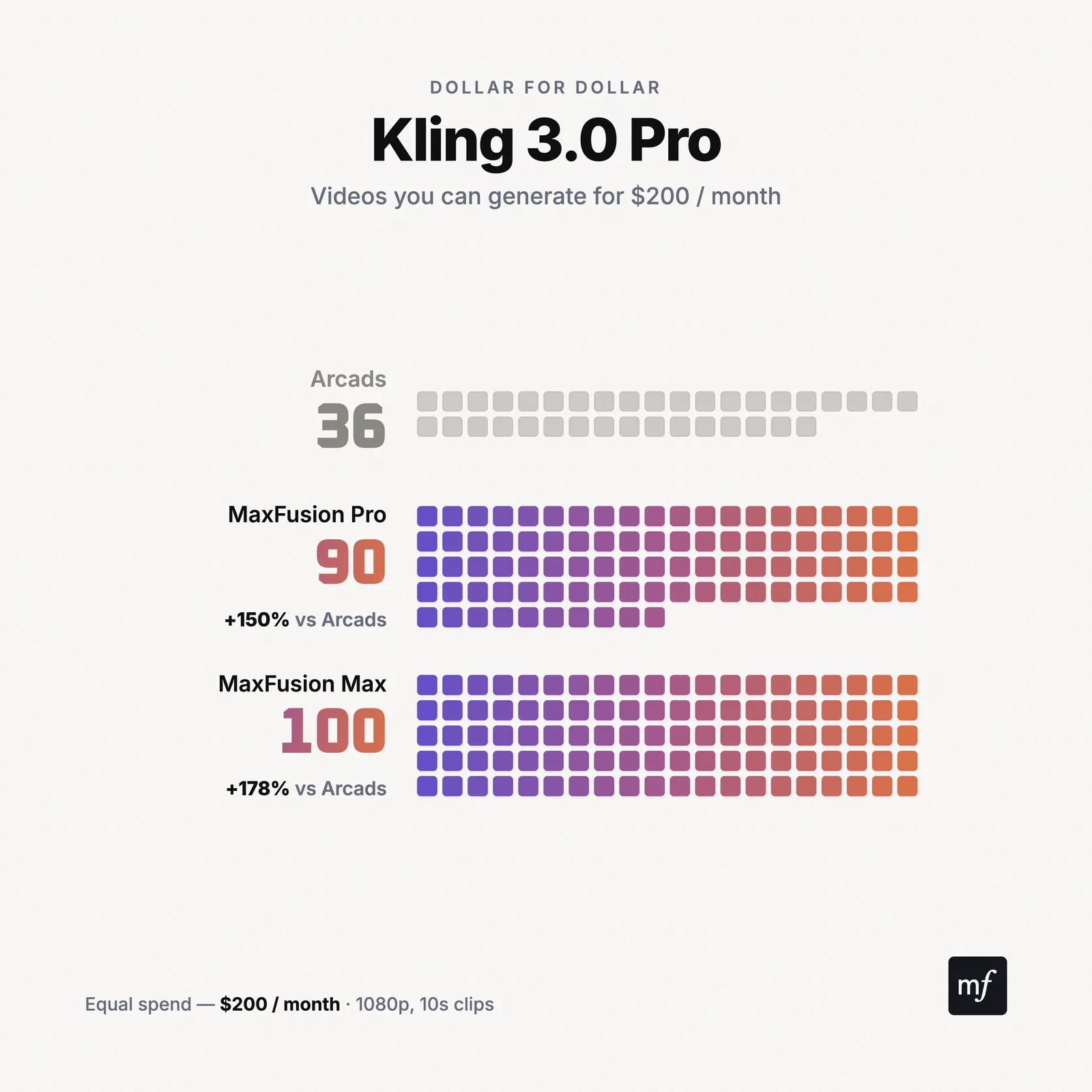
Kling 3.0 Pro (1080p) | 90 | 100 | 36 | +150% | +178% |
Kling 3.0 Pro Turbo (1080p) | 113 | 125 | 24 | +371% | +421% |
Kling 2.6 (1080p) | 90 | 100 | 36 | +150% | +178% |
MiniMax H3 (2K) | 90 | 100 | Not available | — | — |
Flux 3 (720p) | 90 | 100 | Not available | — | — |
Google Omni (720p) | 113 | 125 | 60 | +88% | +108% |
Seedance 1.5 Pro (720p) | 226 | 250 | 73 | +210% | +242% |
Talking actor videos (<60s) | 56 | 62 | 18 | +211% | +244% |
RIZZ audio-driven avatar (60s) | 36 | 40 | ✗ | — | — |
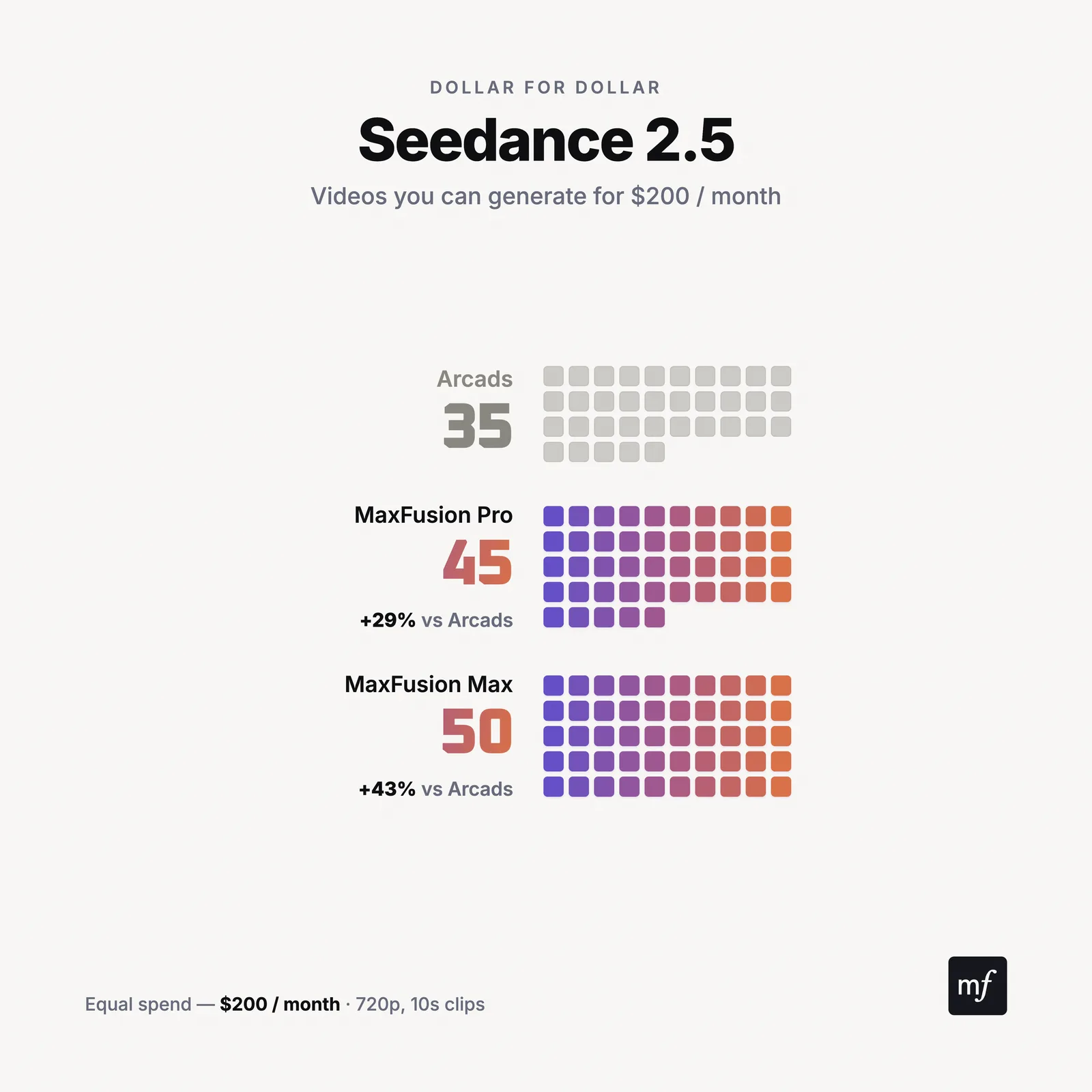
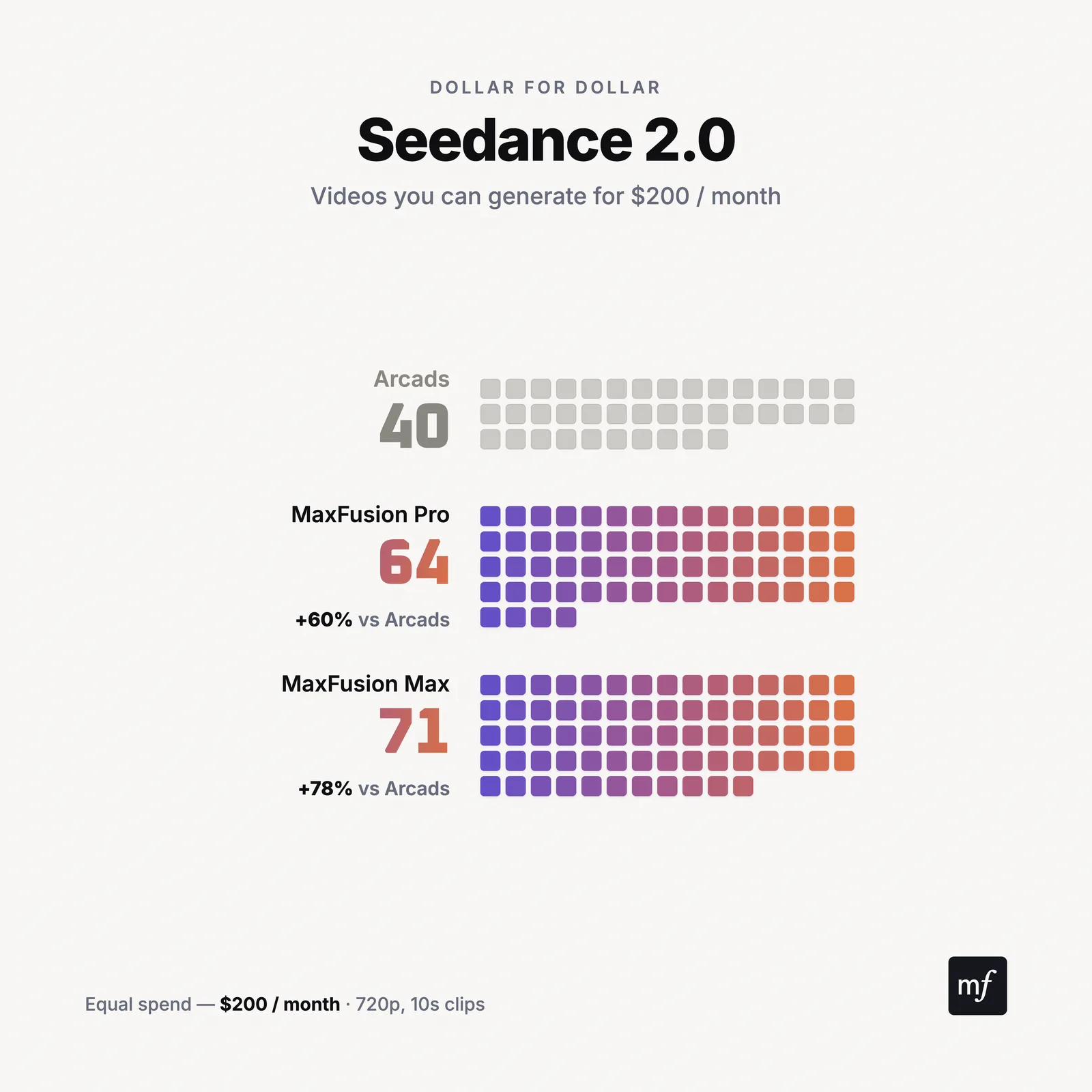
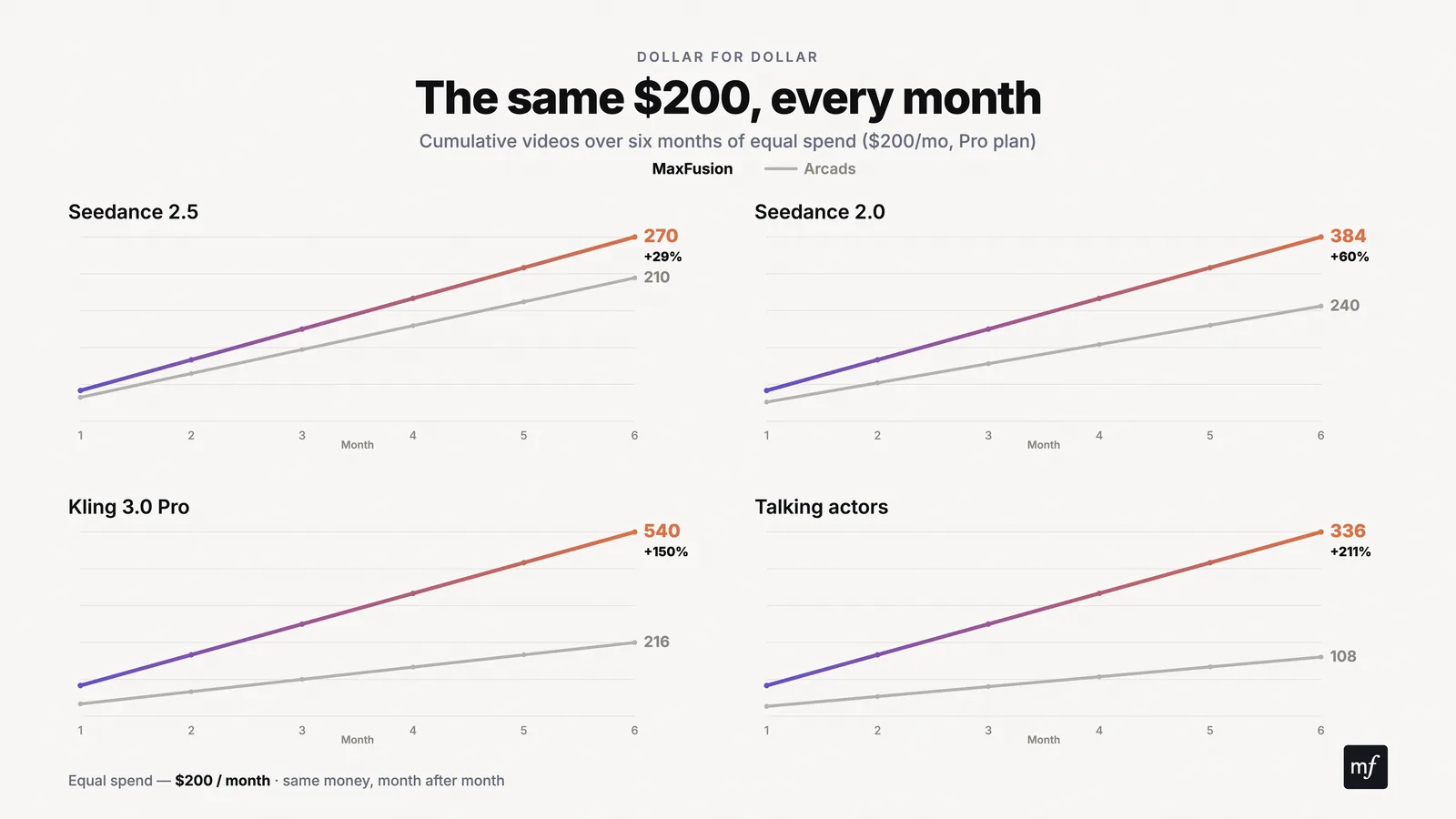
This table equalizes spend at exactly $200 a month on every column, so the only variable left is how many credits each platform charges to generate one video the true per-dollar value of each generation, compared apples to apples. Arcads charges the same per credit across all of its plans, so its column is identical at every tier. Maxfusion AI is the opposite: the more you spend, the more credits each dollar buys. The Pro plan gives about 22.6 credits per dollar and the Max plan gives 25 - roughly 10% more, so the same $200 stretches further on Max, and the lead over Arcads widens again.
What only Maxfusion AI has
RIZZ. Maxfusion AI’s own audio-driven avatar model. You give it audio and a starting frame, and it builds the performance around the delivery: lip sync, timing, and expression driven by the sound itself. In the talking-head category it’s the strongest audio-driven realism engine on any ad platform, and it exists nowhere else.
MiniMax H3 and Flux 3. Two of the strongest generation models of 2026, both absent from Arcads. MiniMax H3 generates at 2K resolution. Flux 3 covers 720p and 1080p at one of the lowest prices per clip on the platform.
What only Arcads AI has
The verified actor library. Arcads’ closed library of verified actors is the core of its product. If your entire production model is picking an actor’s face from a roster and putting your script in their mouth, that library is the draw, and it’s genuinely good.
Beyond the library, Arcads’ edge is packaging. Its closed tools produce a talking-head ad with very few decisions. That simplicity is the key to working with that tool and it’s priced accordingly: $11.00 per talking actor video. This is good for specific type of work and starts to become a real pain when you try to scale further.
Is Arcads AI expensive compared to Maxfusion AI
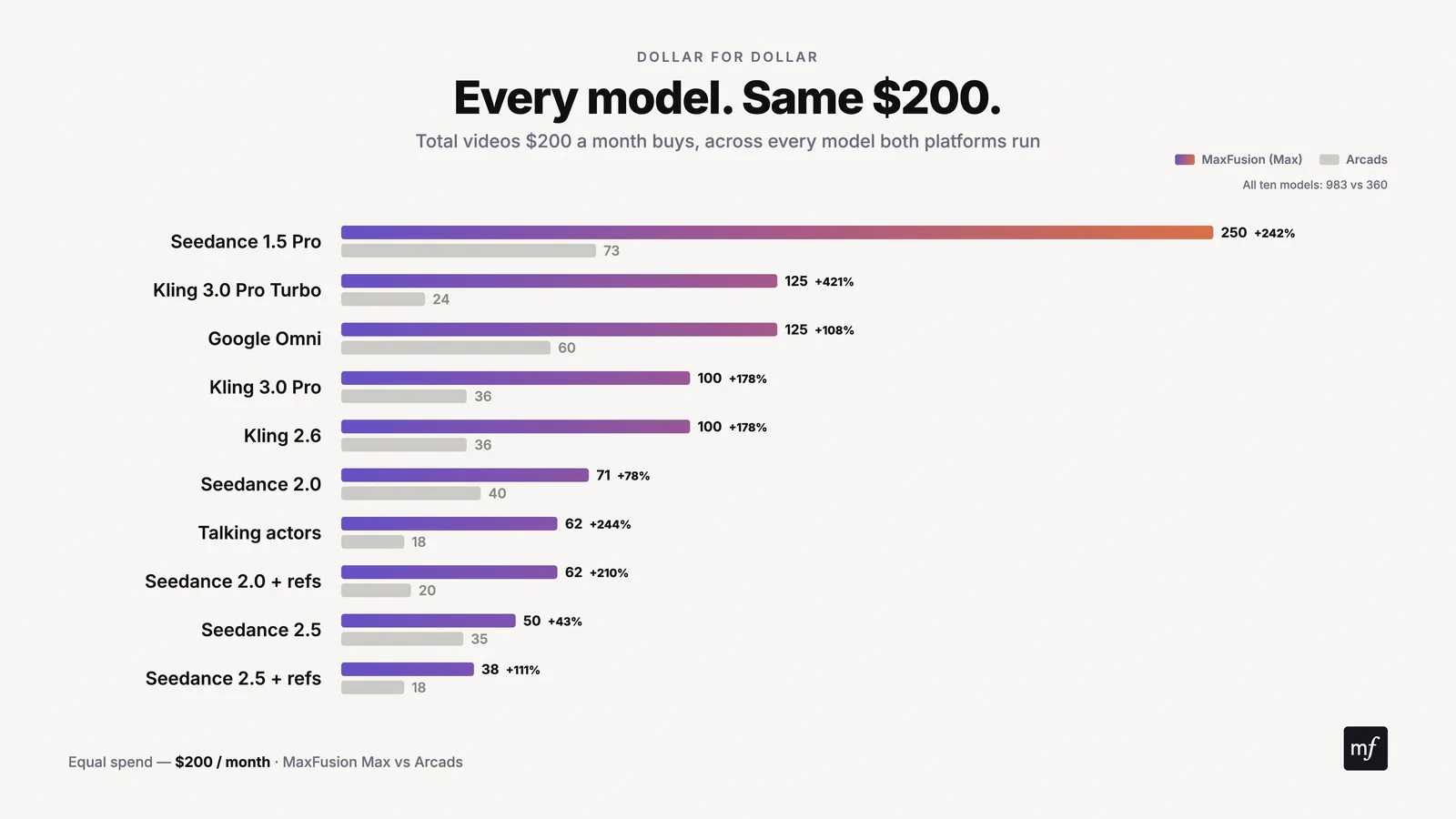
Yes. On every model both platforms carry, the same monthly budget buys fewer videos on Arcads, across all 3 plans on each side, with no exceptions in the current pricing data.
Put the two mid plans side by side. On Seedance 2.5, a month of Maxfusion AI Pro at $199 produces 45 clips against 38 on Arcads Creator at $220. On Kling 3.0 Pro Turbo the gap is at its widest, 112 clips against 26. And on talking actor videos, the format Arcads is known for, Maxfusion AI Pro produces 56 a month against 20 on Creator.
The difference holds at the top end too. Arcads’ $550 Pro plan tops out at 50 talking actor videos a month, fewer than Maxfusion AI’s $199 plan delivers. Arcads isn’t priced for volume, or scale.
The value question for high-volume generators
Creating ads isn’t like creating organic content. One good organic video can carry a channel for a week. Paid creative burns out, gets fatigued, and gets beaten by the next variation. The only reliable answer in paid is scale: more angles, more hooks, more formats, more tests. And the biggest chokehold on scale is the price of each generation.
Run the numbers on a real month. Say your team tests 30 second Seedance 2.5 ads, the strongest model for long-form product ads. On Maxfusion AI Pro, a 30 second 720p generation runs $13.27. On Arcads Creator, the same generation runs $17.32. Test 15 concepts and Maxfusion AI Pro covers all of them inside the $199 plan. Arcads Creator covers 12 inside $220.
Now the volume formats. Kling 3.0 Pro Turbo at 1080p: 112 clips a month on Maxfusion AI Pro, 26 on Arcads Creator. Google Omni: 112 against 66. Talking actors: 56 against 20, and you have to reach the $550 Arcads Pro plan to hit 50.
You can make ads on both platforms. But if scale matters to you, if you need consistent characters across dozens of variations, higher volume at higher quality, and the testing velocity paid social demands, Maxfusion AI gives you much higher value for the same money. At that point the choice stops being a preference and becomes arithmetic.
Who actually benefits from each platform?
Choose Maxfusion AI if:
You need the same character to appear consistently across all of your generations.
You need a range: realistic UGC, claymation, Pixar-style animation, singing ads, crochet ads, medical explainers, and whatever format next quarter demands.
You’re a high-volume generator and scaling production is the point.
You work with AI agents, or want to, and need a platform an agent can operate end to end.
You’re earlier in your ad journey and want skills and a support system that carry you from first ad to full pipeline.
Choose Arcads AI if:
Your production is talking-head UGC only.
Your workflow depends on their verified actor library specifically.
You prefer closed, pre-built tools that produce specific parts of the ad, and volume isn’t a concern.
If you don’t care for scale and need just a specific amount of AI UGC ads each month.
Maxfusion AI or Arcads AI: which one is right for your workflow?
Choosing between Maxfusion AI and Arcads AI comes down to what you’re building around the models, not the models themselves. The models are just generation. Both platforms will hand you a clip.
If you want a platform that carries all of your generation and helps you make the creative decisions, gives you the skills, the canvas, the agent access, and lets you scale across every angle and format an ad account needs, Maxfusion AI is the right choice.
If you mainly want talking actors from a verified library, or small closed tools that produce individual pieces of an ad, Arcads AI does that, at a higher price per video.
Neither is a wrong choice. It depends on what you’re trying to achieve. If what you’re after is scale, volume, and more finished ads per dollar, the arithmetic in this article points one way.
" height="57.25593113035147px" id="pFbN4t6nI" transform="translate(73 0)" width="138.9190010986328px"/><path d="M 58.958 24.529 L 67.611 12.149 L 59.372 0.274 L 64.067 0.274 L 70.234 9.479 L 76.217 0.274 L 80.774 0.274 L 72.58 12.287 L 81.37 24.529 L 76.723 24.529 L 70.003 15.279 L 63.375 24.529 L 58.957 24.529 Z M 44.566 24.809 C 43.479 24.811 42.396 24.671 41.345 24.394 C 40.359 24.1 39.426 23.649 38.583 23.059 C 37.789 22.45 37.131 21.682 36.65 20.804 C 36.19 19.884 35.96 18.824 35.96 17.628 C 35.96 16.248 36.205 15.082 36.696 14.13 C 37.218 13.18 37.908 12.427 38.768 11.875 C 39.627 11.323 40.624 10.924 41.759 10.679 C 42.924 10.43 44.112 10.306 45.303 10.31 L 52.437 10.31 C 52.437 8.93 52.237 7.733 51.838 6.72 C 51.47 5.708 50.857 4.926 49.998 4.373 C 49.138 3.79 48.003 3.499 46.592 3.499 C 45.786 3.493 44.982 3.585 44.198 3.775 C 43.462 3.959 42.833 4.251 42.311 4.649 C 41.79 5.049 41.406 5.585 41.161 6.26 L 36.972 6.26 C 37.187 5.156 37.602 4.22 38.215 3.453 C 38.848 2.664 39.63 2.008 40.516 1.52 C 41.436 0.998 42.419 0.615 43.462 0.37 C 44.487 0.126 45.538 0.002 46.592 0 C 50.09 0 52.575 1.029 54.048 3.085 C 55.52 5.14 56.257 7.917 56.257 11.415 L 56.257 24.532 L 52.989 24.532 L 52.759 21.448 C 52.084 22.368 51.271 23.075 50.319 23.565 C 49.397 24.047 48.402 24.373 47.374 24.532 C 46.449 24.711 45.509 24.803 44.566 24.808 Z M 44.935 21.356 C 46.469 21.356 47.788 21.111 48.893 20.62 C 50.028 20.098 50.903 19.347 51.516 18.365 C 52.13 17.383 52.436 16.186 52.436 14.775 L 52.436 13.578 L 48.156 13.578 C 47.144 13.578 46.146 13.593 45.165 13.624 C 44.183 13.654 43.293 13.778 42.495 13.992 C 41.698 14.207 41.053 14.575 40.562 15.097 C 40.102 15.618 39.872 16.37 39.872 17.352 C 39.872 18.272 40.102 19.024 40.562 19.607 C 41.053 20.19 41.682 20.635 42.449 20.942 C 43.249 21.218 44.089 21.358 44.935 21.356 Z M 0 24.532 L 0 0.277 L 3.774 0.277 L 3.958 3.177 C 4.48 2.44 5.063 1.842 5.707 1.382 C 6.381 0.922 7.128 0.58 7.917 0.369 C 8.769 0.12 9.652 -0.004 10.54 0.001 C 12.227 0.001 13.593 0.369 14.636 1.105 C 15.669 1.799 16.483 2.773 16.983 3.913 C 17.505 3.119 18.141 2.405 18.87 1.796 C 19.602 1.216 20.427 0.764 21.31 0.461 C 22.23 0.154 23.242 0.001 24.347 0.001 C 26.127 0.001 27.553 0.384 28.627 1.151 C 29.732 1.919 30.53 2.961 31.02 4.281 C 31.511 5.57 31.757 7.027 31.757 8.653 L 31.757 24.532 L 27.845 24.532 L 27.845 10.632 C 27.845 9.835 27.799 9.022 27.707 8.193 C 27.654 7.4 27.467 6.622 27.154 5.892 C 26.848 5.156 26.387 4.572 25.774 4.143 C 25.191 3.683 24.362 3.453 23.288 3.453 C 22.276 3.453 21.417 3.698 20.711 4.189 C 20.036 4.649 19.484 5.279 19.054 6.076 C 18.621 6.885 18.311 7.754 18.134 8.654 C 17.95 9.544 17.858 10.434 17.858 11.323 L 17.858 24.532 L 13.945 24.532 L 13.945 10.586 C 13.945 9.819 13.899 9.022 13.807 8.193 C 13.755 7.405 13.584 6.629 13.301 5.892 C 13.076 5.183 12.623 4.568 12.012 4.143 C 11.429 3.683 10.616 3.453 9.573 3.453 C 8.1 3.453 6.95 3.883 6.121 4.741 C 5.293 5.57 4.71 6.598 4.372 7.825 C 4.07 8.982 3.916 10.173 3.912 11.369 L 3.912 24.532 Z" fill="rgb(21, 22, 27)" height="24.80901853219235px" id="Dy5HPNSvH" transform="translate(0 18.5)" width="81.37000073242189px"/></g></svg>)
" height="32px" id="VmykzZzNe" width="32px"/></svg>)
" height="30.633213969252477px" id="w5KefWMGh" transform="translate(0 1)" width="32px"/></svg>)
" height="32px" id="KxxfrbxU7" width="32px"/></g></svg>)
" height="22.41686631528509px" id="wfz7J8dwQ" transform="translate(0 5)" width="32px"/></svg>)
" height="57.25593113035147px" id="ZNNxR3481" transform="translate(73 0)" width="138.9190010986328px"/><path d="M 58.958 24.529 L 67.611 12.149 L 59.372 0.274 L 64.067 0.274 L 70.234 9.479 L 76.217 0.274 L 80.774 0.274 L 72.58 12.287 L 81.37 24.529 L 76.723 24.529 L 70.003 15.279 L 63.375 24.529 L 58.957 24.529 Z M 44.566 24.809 C 43.479 24.811 42.396 24.671 41.345 24.394 C 40.359 24.1 39.426 23.649 38.583 23.059 C 37.789 22.45 37.131 21.682 36.65 20.804 C 36.19 19.884 35.96 18.824 35.96 17.628 C 35.96 16.248 36.205 15.082 36.696 14.13 C 37.218 13.18 37.908 12.427 38.768 11.875 C 39.627 11.323 40.624 10.924 41.759 10.679 C 42.924 10.43 44.112 10.306 45.303 10.31 L 52.437 10.31 C 52.437 8.93 52.237 7.733 51.838 6.72 C 51.47 5.708 50.857 4.926 49.998 4.373 C 49.138 3.79 48.003 3.499 46.592 3.499 C 45.786 3.493 44.982 3.585 44.198 3.775 C 43.462 3.959 42.833 4.251 42.311 4.649 C 41.79 5.049 41.406 5.585 41.161 6.26 L 36.972 6.26 C 37.187 5.156 37.602 4.22 38.215 3.453 C 38.848 2.664 39.63 2.008 40.516 1.52 C 41.436 0.998 42.419 0.615 43.462 0.37 C 44.487 0.126 45.538 0.002 46.592 0 C 50.09 0 52.575 1.029 54.048 3.085 C 55.52 5.14 56.257 7.917 56.257 11.415 L 56.257 24.532 L 52.989 24.532 L 52.759 21.448 C 52.084 22.368 51.271 23.075 50.319 23.565 C 49.397 24.047 48.402 24.373 47.374 24.532 C 46.449 24.711 45.509 24.803 44.566 24.808 Z M 44.935 21.356 C 46.469 21.356 47.788 21.111 48.893 20.62 C 50.028 20.098 50.903 19.347 51.516 18.365 C 52.13 17.383 52.436 16.186 52.436 14.775 L 52.436 13.578 L 48.156 13.578 C 47.144 13.578 46.146 13.593 45.165 13.624 C 44.183 13.654 43.293 13.778 42.495 13.992 C 41.698 14.207 41.053 14.575 40.562 15.097 C 40.102 15.618 39.872 16.37 39.872 17.352 C 39.872 18.272 40.102 19.024 40.562 19.607 C 41.053 20.19 41.682 20.635 42.449 20.942 C 43.249 21.218 44.089 21.358 44.935 21.356 Z M 0 24.532 L 0 0.277 L 3.774 0.277 L 3.958 3.177 C 4.48 2.44 5.063 1.842 5.707 1.382 C 6.381 0.922 7.128 0.58 7.917 0.369 C 8.769 0.12 9.652 -0.004 10.54 0.001 C 12.227 0.001 13.593 0.369 14.636 1.105 C 15.669 1.799 16.483 2.773 16.983 3.913 C 17.505 3.119 18.141 2.405 18.87 1.796 C 19.602 1.216 20.427 0.764 21.31 0.461 C 22.23 0.154 23.242 0.001 24.347 0.001 C 26.127 0.001 27.553 0.384 28.627 1.151 C 29.732 1.919 30.53 2.961 31.02 4.281 C 31.511 5.57 31.757 7.027 31.757 8.653 L 31.757 24.532 L 27.845 24.532 L 27.845 10.632 C 27.845 9.835 27.799 9.022 27.707 8.193 C 27.654 7.4 27.467 6.622 27.154 5.892 C 26.848 5.156 26.387 4.572 25.774 4.143 C 25.191 3.683 24.362 3.453 23.288 3.453 C 22.276 3.453 21.417 3.698 20.711 4.189 C 20.036 4.649 19.484 5.279 19.054 6.076 C 18.621 6.885 18.311 7.754 18.134 8.654 C 17.95 9.544 17.858 10.434 17.858 11.323 L 17.858 24.532 L 13.945 24.532 L 13.945 10.586 C 13.945 9.819 13.899 9.022 13.807 8.193 C 13.755 7.405 13.584 6.629 13.301 5.892 C 13.076 5.183 12.623 4.568 12.012 4.143 C 11.429 3.683 10.616 3.453 9.573 3.453 C 8.1 3.453 6.95 3.883 6.121 4.741 C 5.293 5.57 4.71 6.598 4.372 7.825 C 4.07 8.982 3.916 10.173 3.912 11.369 L 3.912 24.532 Z" fill="rgb(41, 42, 47)" height="24.80901853219235px" id="MB0beBzDo" transform="translate(0 18.5)" width="81.37000073242189px"/></g></svg>)